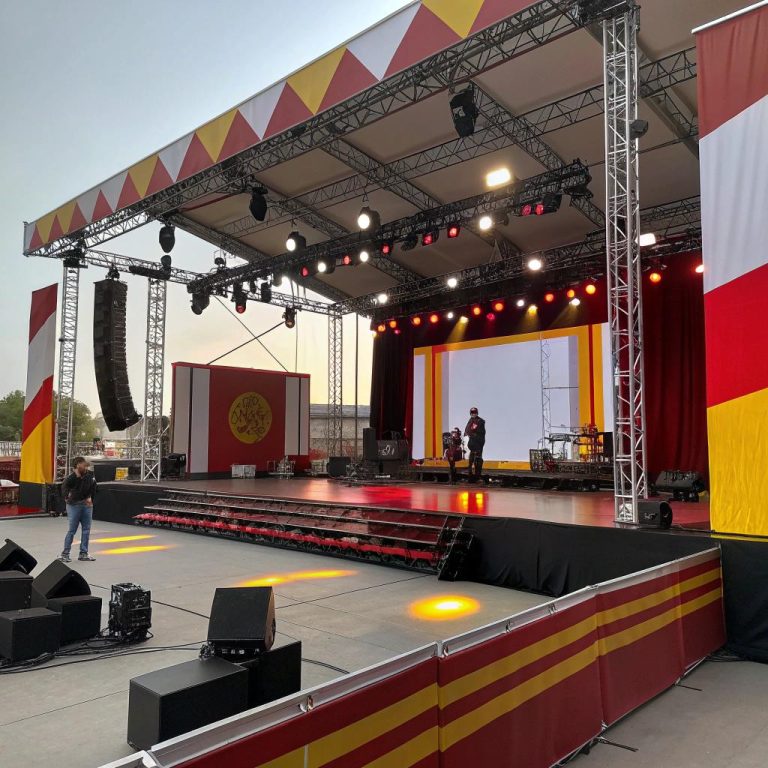
The moment the house lights die and the first cue hits, you probably feel it before you think it. The floor hums a little, a wall of pixels wakes up, hidden fixtures paint a path through haze, and a quiet room becomes somewhere else entirely. That hit of immersion, that sense that the room just changed shape around you, is not magic. It is power, wiring, and planning that you almost never see.
In simple terms, a good commercial electrical installation for an immersive stage is one that delivers stable power where you need it, keeps show control clean and quiet, separates high and low voltage paths, gives you safe access for last‑minute changes, and still looks tidy when someone opens a panel at 3 a.m. It means enough circuits, enough headroom, and enough thought so your show design is not limited by flickering LED walls, tripped breakers, or buzzing audio. If you walk into a venue and do not think about the electrical work at all, that probably means it was done well.
What makes an immersive stage different electrically?
A regular proscenium stage is already a hungry space. Immersive stages stretch that demand across floors, ceilings, corridors, and often places that were never meant to be performance areas.
You are not only lighting a stage. You are lighting audience pathways, ceiling grids, hidden alcoves, and maybe bathrooms. Sound is coming from all directions, not just a left/right pair. The set might have moving walls, embedded screens, sensors, and show control in multiple rooms.
So the electrical layout has to think like a set designer, not just like a building engineer.
Immersive stages pull the electrical system off the wall and wrap it around your audience.
A commercial installer who works on retail or office fitouts might be great with code, loading, and routing. For immersive work, you also need them comfortable with:
– Many more low‑voltage systems in close proximity to mains
– Constant changes during rehearsals
– Big loads that move around the space
– Power for show equipment that is not fixed to the building
If your show wants the audience to feel surrounded, the power plan has to surround them too.
Key differences you feel during a show
| Standard stage | Immersive stage |
|---|---|
| Lighting mostly front and overhead | Lighting above, below, inside walls, around the audience |
| Few fixed speaker positions | Dozens of distributed speakers and subs |
| Control in a single booth | Control nodes in multiple rooms or zones |
| Clear back‑of‑house vs audience areas | Audience walks through tech spaces and set pieces |
| Limited audience interaction | Sensors, triggers, and wearables all over the space |
Each of those differences has a direct effect on how you run power and signal.
Planning power with the show in mind
I have seen shows run from two 20‑amp circuits and a mountain of power strips. They ran, but every tech rehearsal felt like a tightrope walk. For an immersive stage, that kind of approach is risky.
Good electrical planning treats your show like a permanent resident, not a visitor borrowing a few outlets.
Start with a map, not a panel schedule
Before you talk about amps, panels, or breaker counts, you need a visual map of your show.
Ask yourself:
– Where can the audience walk?
– Where can performers climb, crouch, or lean?
– Where do you expect practicals, screens, or dummy props with hidden tech?
– Which surfaces might become projection or LED surfaces later?
Lay this out on a ground plan. Then sketch possible power drops on a copy. That map will often reveal that your first instinct, which might have been to run power only along the walls, is not enough.
You might need floor boxes in open circulation routes, power bars in overhead grids, and spare circuits in strange corners for future surprises.
Allow for growth and “that extra thing”
Shows change. Directors change their minds. Someone finds a prop two weeks before opening and suddenly that needs to light up, move, and make sound.
If you size your system exactly to your opening night plot, you will probably end up at 110 percent load during the run. That is stressful for gear and for humans.
A more realistic approach:
- Plan your connected load, but keep it under about 80 percent of your panel capacity.
- Add spare circuits in each zone, even if you think you will not use them.
- Leave space in panels for extra breakers, not just blank plates.
You might feel like this is wasted money on day one. Then you will have that late request for another run of LED strip, and it will suddenly feel very smart.
Separating power, data, and sound
Immersive stages rely heavily on low‑voltage systems: Ethernet, DMX, audio, timecode, sensor wiring, even plain old contact closures.
If these run alongside mains cables without any thought, you get flickers, noise, and glitches that are maddening to trace.
Clean separation between high and low voltage is one of the quiet heroes of a stable immersive show.
Physical separation
Try not to bury everything in one giant cable tray. A simple rule that tends to work:
- Run mains power in one path.
- Run audio and sensitive control in another.
- If they must cross, do it at right angles, not in parallel.
If you are using metal conduit, it can help shield some interference. Still, parallel runs over long distances are where you get into trouble.
For overhead grids, I like having:
– One side of the grid used for power runs
– The other side for data and audio
– Short hop cables across when needed
It is not perfect, but it keeps things more predictable.
Logical separation
Think in layers:
– Power for lighting and media fixtures
– Power for audio amplifiers and subs
– Power for show control, networking, and computers
Putting all of those on a single panel is tempting. It also means that when you reset one tripped branch, you risk blips everywhere.
Having separate panels or at least separate sections helps:
| Panel / section | Main users | Why it helps |
|---|---|---|
| Lighting / video | Fixtures, dimmers, LED walls | Handles heavy and changing loads |
| Audio | Amps, DSP, powered speakers | Reduces hum and shared noise |
| Control / IT | Consoles, servers, network switches | Keeps control stable if show gear trips |
If your venue is smaller, this might just mean careful circuit grouping, not three separate panels. The idea is the same.
Powering lights, media, and moving scenery
Lighting and video usually take the largest chunk of the power budget in an immersive stage. Moving pieces of set add another layer.
Lighting loads feel lighter, until they do not
LED fixtures have changed the math. A rig that would have needed hundreds of amps in the tungsten era might now run on a fraction of that.
The trap is that we then add more gear.
Pixel tape, LED walls, interactive floors, moving heads everywhere. Your per‑fixture load is lower, but your count goes up. The total still climbs fast.
Good practice:
- List every fixture by type, with its actual wattage, not a guess.
- Include scenic lighting, practicals, and hidden strips in that list.
- Add a margin for maintenance units or swap‑outs that draw more.
If you work with rental gear, wattage can change when a fixture type changes. So keep the list flexible.
LED walls and projectors
Large LED walls and high‑power projectors can pull serious current.
– Many walls are modular, fed by several supplies
– Power distribution is often built into the frame
– Inrush current at power up can be high
You might want:
– A dedicated supply for the wall or projection cluster
– Staggered power on sequences, so everything does not start at once
– A UPS for crucial image processors
If a wall sits behind a scenic skin or in a tight cavity, cooling also affects power. Fans, AC, and ventilation all add to your total draw.
Moving set pieces
Motorized walls, winches, and lifts belong in the “do not improvise” category. They need correct protections, limit switches, emergency stops, and often compliance with stage machinery standards.
Electrically, that means:
– Separate feeds for motion controls
– Hardwired E‑stop circuits that override show cues
– Clear labeling so local crews know how to isolate a piece if it jams
Do not bury motion control hardware in a place you cannot reach. That sounds obvious, but I have seen a motor control box sealed behind a “permanent” wall more than once.
Audience safety and hidden hazards
Immersive shows bring the public much closer to powered elements than a standard seated show does. Sometimes right up against them.
You might know that panel in the “alley” is safe. A guest does not see “alley”. They see “dark hallway with a mysterious door I want to open.”
Protective layers that do not kill the vibe
Visible conduit, covers, and cages can spoil the mood if they look like a warehouse. You still need them, but you can fold them into the design.
Some tricks that often work:
- Hide floor boxes under removable scenic plates that still allow ventilation.
- Use conduit as a deliberate visual element, painted or patterned.
- Build false panels over distribution with magnetic catches for quick tech access.
Work with your set designer. Tell them early where you must protect things. They can often turn your “ugly box” into a prop, a fake breaker wall, or part of the story.
Differential protection, bonding, and all the boring bits
RCDs / GFCIs, bonding of metal parts, and clear ground paths are the unglamorous parts of the job, but they matter even more when guests can touch things.
– Any exposed conductive part that can become live in a fault needs bonding.
– Outdoor or damp immersive spaces need more careful selection of devices.
– Temporary installs deserve the same care as permanent ones, not less.
In an immersive bar show I saw, a metal handrail was part of the lighting concept, with LED tape hidden under a lip. The rail bonding had been missed during a rushed refit. Nothing bad happened, but that was luck, not planning.
Temporary vs permanent installations
Immersive work often lives in the grey area between “temporary show” and “permanent fitout”. That grey area can cause confusion and cut corners if you let it.
If your show runs for months or years, then the power feels permanent to the audience, whatever label you give it behind the scenes.
Short runs and pop‑ups
For short runs:
– You might use more distro racks and hoists
– Cable ramps and temporary protection are normal
– Load calculations still matter, but may be based on portable gear
The main risk here is that temporary layouts tend to accumulate changes. What starts as a clear plot often turns into a spaghetti field after a week of experimenting.
You can keep this under control with:
- Regular checks of cable routes and labeling.
- A simple update log of what circuits feed which areas.
- Firm rules on what can be added without sign‑off.
Long runs and conversions
If you are converting a warehouse, church, or office for a long‑term immersive show, treat the electrical like any other commercial refit.
That usually means:
– New or upgraded service entrance
– New distribution panels sized for future use
– Dedicated pathways for show systems
I know budgets are tight, but trying to hang a complex immersive show on the original office circuits tends to end in constant patching. It also makes life very hard for the next production.
Think about future tenants. They might want a different show, or not a show at all. A clean, well planned installation will help the building, not just your project.
Control rooms, zones, and failover
Even when the audience roams freely, your control systems need an anchor. Or maybe more than one anchor.
Distributed control
Central control booths are less practical when you have multiple rooms or routes. You might have:
– A main control room for lighting, audio, and video
– Local control stations in key zones
– Portable tablets or panels for cueing on the move
Electrically, that means:
– Clean power for each control node
– Network paths that avoid single points of failure
– Somewhere safe to reboot equipment without climbing sets
I like having at least one “quiet” rack room away from guest routes, where core switches, servers, and power control live. Even if your show likes to show off its backstage, some things are better hidden.
Power control and remote switching
Remote power switching systems, often used for:
– Turning on racks in sequence
– Resetting tripped or hung devices
– Saving energy overnight
If you use these, keep direct manual override available. One day your control software will misbehave or the network will drop. You will want to walk over and turn something on with your hands.
UPS units for servers and critical network gear are also worth thinking about. You do not need the whole show on UPS. You just need the layer that keeps your brain running and allows clean shutdowns if mains fails.
Working with electrical contractors on an immersive project
Not every commercial electrician will be comfortable with theatrical work, and not every theatre electrician will want to take on full commercial responsibilities. The sweet spot is someone who respects both.
How to brief an installer so they help your show, not fight it
When you first sit down with an installer, walk them through:
- The audience path from door to exit.
- The main performance beats in each area.
- Parts of the set that may move or change later.
- Your biggest power hogs and their locations.
Give them your load estimates, but ask them to question you. If they think something is low, listen. They have seen plenty of projects where “just a few lights” turned into a rack room.
Bring them to a tech rehearsal if you can. Seeing the cues, the timing, and the stress in the room tells them more than any drawing.
Language differences
Set designers talk in moods and pictures. Electricians talk in loads and circuits. There is a gap there.
Examples:
– You say “this corner should feel like it is pulsing”. They hear “dimmer, LED drivers, maybe DMX outstation”.
– You say “the wall might move later”. They hear “allow flexible power tails and extra slack”.
It helps to put both views on the same drawing. A plan that shows mood notes and cue types, next to power drops, helps everyone.
Labeling, documentation, and the 3 a.m. problem
Most shows are fixed or debugged at bad hours, when people are tired. That is when clear labeling and simple documentation become precious.
Good labels are a gift to your future self, or to the poor tech who inherits your show.
Good labels feel boring. That is the point.
Some simple habits:
- Label both ends of every cable that is part of the permanent install.
- Use plain language: “Zone A grid power 1” is better than a code no one remembers.
- Keep circuit numbers visible at outlets and in the panel.
Avoid relying on color alone. Lights fail, tape fades, people are color blind. Text wins.
Paper and digital, not one or the other
Have at least:
– A printed one‑line schematic near each major electrical room
– A set of updated floor plans with power, data, and major gear
– A digital copy that can be shared with new team members
Whenever you make a real change, update both. It feels tedious, but it saves you from tracing circuits live during a rush call.
Accessibility and maintenance
A neat install that no one can reach is not really neat. Immersive sets are notorious for swallowing access routes: false walls, ceilings covered in fabric, scenic boxes on top of panels.
Design with future access in mind
Questions to ask while you design:
– Can someone change this fixture without breaking the set?
– If a breaker trips, can a tech reach the panel without crossing the stage mid‑show?
– Are there safe ladders, platforms, or catwalks to main electrical points?
Try to avoid burying junction boxes behind fixed scenery. If you must, use access hatches that blend into the set but can open fast.
Maintenance time matters too. If every lamp change takes two hours of de‑rigging, they will be skipped or delayed. Then your show starts to feel tired.
Acoustics, audio power, and hum
Immersive audio can be subtle. A small hum in a normal concert might be masked. In a quiet, intimate scene with a single whispered line, that same hum becomes a big problem.
Power for quiet audio
Good practice for audio power in these spaces:
- Separate audio circuits from heavy lighting loads where possible.
- Keep amplifier power runs as short as practical.
- Use proper grounding schemes, not ad‑hoc lifting to “fix” hum.
If you can, group speakers and amps by zone, with dedicated feeds. This also helps with troubleshooting when a zone goes silent.
Digital audio over network helps a lot, but it pushes more of the burden onto stable power for switches, DSPs, and converters. Those can be small loads, but very sensitive.
Energy use and running costs
Immersive shows can be power hungry, but they do not have to be careless. Rising energy costs hit venues hard, and long‑running shows feel that.
Smart habits that do not hurt the show
You do not need complex automation to make a difference.
Simple steps:
- Use timed shutdowns for non‑critical gear after the last show.
- Allow standby scenes for rehearsals with reduced lighting and video.
- Choose fixtures with realistic efficiency, not inflated marketing claims.
Sometimes it is as simple as separating rehearsal mode from show mode in your power control. Full rig blaze for 4 hours of tech every day adds up.
Future tech and flexible infrastructure
New toys keep arriving: higher resolution LED panels, tracked projectors, wireless tracking for performers, interactive floors. You might not know exactly what you will want in three years, but you can make room for it now.
What flexibility looks like in wiring
Some ideas:
- Conduit routes with spare capacity along key walls and grids.
- Extra pull strings in closed pathways.
- Spare ports in patch panels and floor boxes.
- Room in racks for more power conditioning or control gear.
People often talk about “future proofing”. That is hard. What you can do is “future friendly”: leave paths open so the next team is not cutting up your work to add their own.
Bringing it all back to the audience
You might wonder if any of this matters to the audience. They do not see breaker panels. They do not care what gauge cable feeds the ceiling grid.
But they notice when:
– A crucial cue misses because a breaker tripped
– A corner of the room stays dark when it should turn alive
– Speakers crackle when they approach a certain wall
– A part of the set is clearly off‑limits because “that bit is fragile”
In many immersive pieces, the audience is invited to touch, lean, and explore. If they feel like everything is secretly delicate, the spell breaks.
A solid commercial electrical installation helps you be generous with your audience. You can let them push doors, sit on platforms, and stand under fixtures without fear that a wire is one bump away from trouble.
Common questions, with honest answers
Q: Can we just use extension cords and power strips if the load is not huge?
A: For small, short shows, careful use of temporary power can work. For any long run or large immersive stage, leaning on extension cords is asking for hidden joins, trip hazards, and undocumented circuits. Use them for testing and iteration, not as the backbone of your show.
Q: Do we really need separate circuits for audio, lighting, and control?
A: “Need” is maybe too strong, but mixing everything on a few circuits often leads to noise, flicker, and mystery resets. Separation gives you cleaner signals and clearer troubleshooting. It is less glamorous than a new projector, but the benefits show up from day one.
Q: Our budget is tight. Where is the best place to spend electrical money?
A: Spend it on safe, stable distribution, spare capacity, and clean separation between mains and data. Fancy power control can come later. A strong core install gives you room to grow the show and swap gear without tearing everything apart.
Q: How early should the electrical design start in the production process?
A: Much earlier than people like to admit. As soon as the set layout and audience route feel stable on paper, bring the electrical team in. Late involvement usually means compromises, exposed gear, and higher installation stress. Early involvement lets you hide infrastructure in the design instead of draping it over the top.